Codename One can compile Dart widget source into a Codename One UI at build time. The Dart is translated to Java, the Java is compiled by the normal toolchain, and the resulting widgets render through Codename One’s own pipeline on every port the framework supports.
There is no Dart VM in the application, no embedded rendering engine, and no
platform view. A screen written as Dart widgets becomes ordinary Codename One
components, so it inherits the theme, the event thread, the accessibility
tree and the native build at no extra cost — and it can sit in the same Form as
hand-written Codename One code.
Two things follow from that, and they’re the reason to reach for this at all:
An existing Dart UI can be reused without adopting a second runtime, a second build system or a second set of platform plugins.
An existing Codename One application can adopt a Dart screen without being rewritten.
How it fits together
The pipeline has three stages, and each is an ordinary build step you can run and inspect on its own.
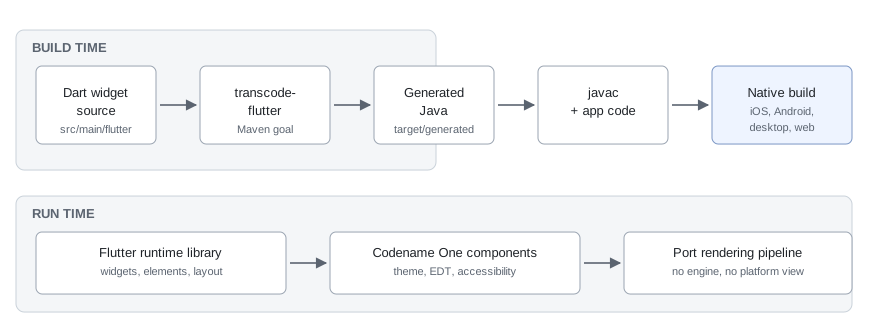
Dart widget source in src/main/flutter is read by the transcode-flutter
goal during generate-sources. It emits Java into
target/generated-sources/flutter, which the normal compile phase picks up.
At runtime those generated classes call into the Flutter runtime library,
which implements the widget, element and render-object model on top of
Codename One containers.
The key design point is where the boundary sits. The runtime reimplements Flutter’s layout and composition model — constraints down, sizes up, elements reconciled against widgets — but it doesn’t reimplement Flutter’s rasterizer. Painting is Codename One’s, which is what makes the output a real Codename One component tree rather than a texture.
Enabling it in a project
Add the runtime dependency to the common module. Projects generated from the
archetype already contain it, commented out:
<dependency>
    <groupId>com.codenameone</groupId>
    <artifactId>codenameone-flutter-runtime</artifactId>
    <version>${cn1.version}</version>
</dependency>
Then put Dart files under common/src/main/flutter. The goal is already bound
in the generated pom.xml and is a silent no-op while that directory doesn’t
exist, so nothing changes for projects that don’t use it.
No Dart SDK is required. The transpiler is Java and runs as part of the Maven build; the Dart source is input, not something that gets executed.
The generated package defaults to com.codename1.generated.flutter and the
paths are configurable:
| Property | Meaning |
|---|---|
| Where the Dart lives. Defaults to |
| Where the generated Java is written. Defaults to
|
| The package the generated classes are emitted into. |
Use case: One screen inside an existing application
This is the incremental path, and the one to start with. FlutterUI.wrap
inflates a widget into a plain Container that can be added anywhere an
ordinary component can:
Form dashboard = new Form("Dashboard", BoxLayout.y());
dashboard.add(new Label("Written in Codename One"));

// A Dart widget tree, compiled to Java at build time. wrap() returns
// an ordinary Container, so it is added like any other component.
dashboard.add(FlutterUI.wrap(new Text("Rendered from Dart")));

dashboard.add(new Button("Also Codename One"));
dashboard.show();
The wrapped subtree is a component like any other: it participates in the parent’s layout, scrolls with it, and is styled by the same theme. An embedded subtree does not install the Material base theme, so dropping a widget into an existing screen won’t restyle the rest of it.
That makes this the right shape for reusing a piece of design work — a chart, a card, an onboarding pane — without committing the rest of the application to anything.
Use case: Porting an application wholesale
When the Dart source is the application, FlutterUI.runApp mounts the tree
as the root of a new Form and shows it, which is the direct analog of
Flutter’s own runApp:
// runApp mounts the tree in a Form of its own and shows it. Unlike
// wrap(), this installs the Material base theme, because the widget
// tree is expected to be the whole UI.
FlutterUI.runApp(new Text("The entire application"));
Unlike wrap, this path installs the Material base theme, because the widget
tree is expected to be the whole UI and to look the way its author intended.
A wholesale port is mostly a question of how much of the Dart language and of the Flutter libraries the application actually uses. The transpiler reports what it can’t handle rather than guessing: a construct outside the supported subset fails the build with a milestone code identifying the feature, so the gap is a list you can work through rather than a runtime surprise.
At runtime the same principle applies. Widgets that aren’t implemented are recorded through the error inventory rather than drawing nothing, so a screen that’s missing something says so.
What to expect from the result
The transpiled UI is a Codename One application in every respect that matters for shipping it: it builds for the same targets, it’s signed and packaged the same way, and it has no additional runtime to install on the device.
That last point is what the size and start-up differences come from, and it cuts both ways — a Flutter application carries an engine that’s good at what it does, while a transpiled one carries Codename One’s. The benchmark described in Measuring it against Flutter measures both sides of the same application on each platform and publishes the result rather than asserting a direction.
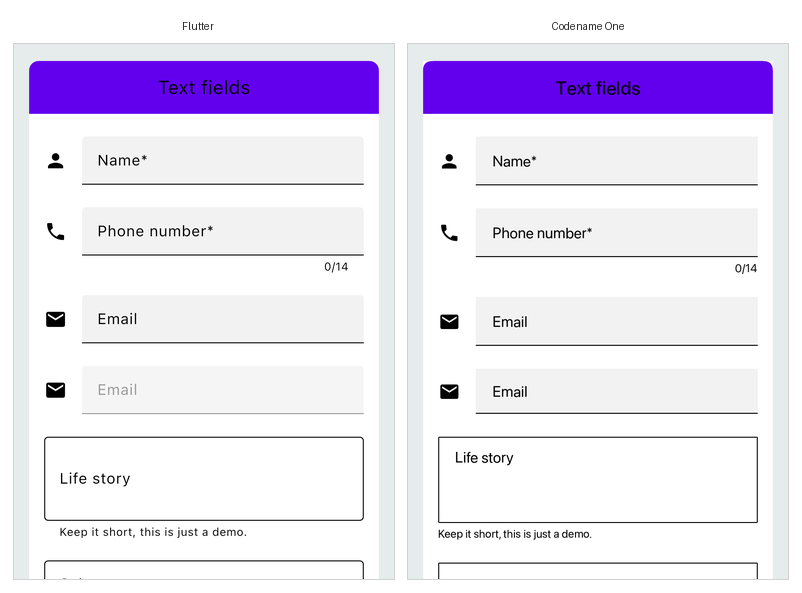
The screen above is the gallery’s text-field demo, rendered by Flutter on the left and by the transpiled build on the right, from one Dart source file.
Measuring it against Flutter
The project keeps a benchmark that builds one application both ways — the
Flutter toolchain’s own release build, and the identical Dart source
transpiled and built by Codename One — and measures both on the same machine.
It lives in scripts/flutter-bench and runs in CI, publishing its numbers to
the pull request and to the port status page.
What it reports, per platform:
| Metric | What it means |
|---|---|
Installed size | The sum of the artifact’s file lengths, which is what the user’s device gives
up. Not |
Executable code | Every compiled binary in the artifact, added together. Counting only the main executable is wrong on iOS, where a Flutter application’s own code isn’t in the executable at all — it’s in the frameworks beside it. |
Download size | The artifact compressed, because that’s what a store ships. |
Cold start | Wall time from launching the process to the first frame being on screen, measured from outside so neither runtime is trusted to time itself. |
Memory at rest | The platform’s own accounting for a settled, idle application. |
Three rules keep the numbers honest, and each exists because the obvious alternative produced a flattering result:
Interleaved runs, best of N. One run of each side, alternating. A machine that gets busier halfway through then penalizes both sides equally instead of whichever happened to run second, and the load average is recorded with every result so a surprising ratio can be checked against it.
Start-up is a bracket, not a point. The two runtimes don’t expose the same event. Flutter’s post-frame callback runs before that frame is rasterized, while Codename One’s marker fires once the form is on the screen, so comparing them directly charges one runtime for rasterizing its first screen and not the other. The benchmark therefore reports Flutter’s figure as a range and computes the ratio from the end least favorable to Codename One.
A platform that can’t be measured says so. iOS start-up and memory are reported as not measured rather than taken from a simulator, because Dart can’t compile ahead-of-time for the simulator — a simulator comparison would time Flutter’s debug build against a Codename One release build. iOS sizes come from release device bundles, which need no signing to measure.
To run it locally against builds you already have:
python3 scripts/flutter-bench/run_bench.py --list

python3 scripts/flutter-bench/run_bench.py --platform macos \
    --cn1-app     /path/to/Bench.app \
    --flutter-app /path/to/gallery.app \
    --json out/macos.json --markdown out/macos.md
--list also reports which platform adapters have been exercised end to end,
which isn’t the same question as which ones exist.